

Meta Description: Learn how to install wire mesh cable trays correctly. This comprehensive guide covers tools, step-by-step instructions, support spacing, and common mistakes to avoid for a safe, professional installation.
Introduction
Proper installation of wire mesh cable trays is crucial for safety, performance, and longevity. A correctly installed tray system ensures cables are properly supported, ventilation is maintained, and the infrastructure remains accessible for future modifications.
But installation isn't just about putting pieces together-it requires planning, the right tools, and attention to detail. Mistakes can be costly, not just financially, but also in terms of time, safety, and long-term performance.
This guide is designed for installers, electricians, site supervisors, and facility managers. We'll walk you through the entire installation process, from planning to final inspection, and highlight common pitfalls to avoid along the way.
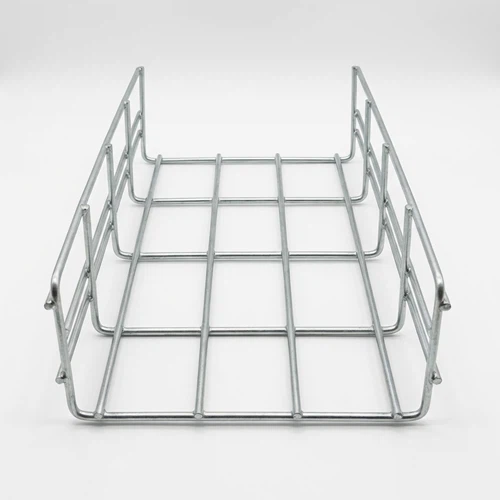
Tools and Materials You'll Need
Before starting, gather all necessary tools and materials:
Materials:
·Wire mesh cable tray sections
·Mounting brackets or suspension rods
·Tray couplers or splice kits
·Cable ties or Velcro straps
·Appropriate wall/ceiling fixings (anchors, screws, etc.)
Tools:
·Tape measure
·Spirit level
·Drill and drill bits
·Bolt cutters or hacksaw
·File (for smoothing cut edges)
·Pliers
·Safety gloves
·Marker or pencil
Having everything ready before you begin saves time and prevents interruptions during installation.
Step-by-Step Installation Guide
Step 1: Plan Your Route
Think of installing a cable tray like laying track for a train. If you don't map the route properly, things go off the rails fast.
Before installation begins, map out the cable path carefully:
·Identify entry and exit points for cables
·Consider cable types and anticipated loads
·Note potential obstacles (beams, HVAC systems, pipes)
·Determine support point locations
·Coordinate with other trades before installation
Pro tip: Use site drawings to plot routes early and account for future expansion and maintenance needs. Creating a layout drawing saves time and prevents surprises during installation.
Step 2: Install Support Brackets
Proper support spacing is essential to prevent sagging and ensure load capacity.
General guidelines:
·Space supports every 1.5 to 2 meters (approximately 5–6.5 feet) for standard installations
·Reduce spacing for heavier loads or high-traffic areas
·For vertical installations, mounting pitch of about 400mm is recommended
·For horizontal installations, 250mm spacing works well
·For ceiling installations, spacing up to 1000mm may be acceptable depending on load
Support types by surface:
|
Surface Type |
Recommended Fixing |
|
Concrete |
Ceiling anchors |
|
Plasterboard |
Cavity fixings |
|
Brick or block |
Masonry screws |
|
Wood studs |
Wood screws |
Installation methods:
·Ceiling mounting: Use threaded rods with suitable anchors
·Wall mounting: Use sturdy brackets fixed into studs or solid walls
·Floor mounting: For raised installations, use floor-mounted stands
Step 3: Cut and Prepare the Tray
Wire mesh trays are easily cut to size on-site-one of their key advantages.
Cutting process:
1. Measure the required length carefully-measure twice, cut once
2. Mark the cutting line clearly
3. Use bolt cutters or a hacksaw to cut through the steel wires
4. Crucial step: File down any sharp edges to prevent cable damage
5. If the protective coating was damaged during cutting, apply touch-up paint to prevent corrosion
Safety reminder: Always wear gloves when cutting and handling wire mesh trays.
Need a bend? You can create one manually or use prefabricated fittings for clean, professional turns. The flexibility of wire mesh means complex angles and changes in direction can be accomplished on-site without waiting for special parts.
Step 4: Secure the Tray Sections
With supports in place, it's time to install the tray:
1. Position the tray section onto the brackets
2. When joining multiple sections, use couplers or splice kits-some systems feature integrated connectors that simply snap together
3. Ensure sections are level-uneven trays are not just unsightly; they create problems for cable installation and can stress cables over time
4. Secure the tray to brackets using appropriate fasteners (hook bolts, clamps, etc.)
5. Check alignment before tightening all fasteners completely
Step 5: Add Accessories
Depending on your installation requirements, you may need additional components:
·Tray dividers: Keep power and data cables separate to avoid electromagnetic interference
·Covers: Protect cables from debris, dust, or physical damage in exposed areas
·Bends, risers, and tees: For directional changes that follow the actual architecture of the site
·Earthing kits: Ensure proper grounding to meet electrical codes
·Drop-outs and reducers: For transitioning to different tray sizes or equipment
Checklist of accessories worth including:
·Tray dividers for power/data separation
·Covers for hygiene or safety
·Risers, bends, tees for directional changes
·Earthing kits to meet regulations
Step 6: Install the Cables
With the tray system in place, it's time to route cables:
1. Lay cables gently-no pulling or yanking that could damage insulation
2. Avoid overloading the tray beyond its weight rating
3. Keep power and data cables separated using dividers (mandatory for preventing interference)
4. Observe minimum bending radii-typically 8-12 times the cable's outside diameter
5. Do not exceed 40-50% fill ratio, as overfilling reduces ventilation and causes overheating
6. Use Velcro straps or cable ties to secure bundles-avoid over-tightening
7. Label cables as you go for easy maintenance later
Step 7: Inspect and Test
Before considering the job complete:
·Verify all supports are secure and properly spaced
·Check that cables are properly seated and not stressed
·Confirm separation requirements are met (power vs. data)
·Test grounding continuity if applicable
·Document the installation for sign-off and future reference
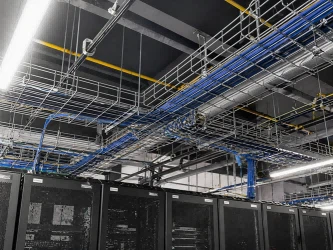
Common Installation Mistakes to Avoid
Even experienced installers can fall into these traps:
1. Poor Planning from the Start
Problem: Not planning the cable routing in advance leads to awkward bends, uneven load distribution, and interference with other services.
Solution: Use site drawings to plot routes early, account for future expansion, and coordinate with other trades before installation.
2. Choosing the Wrong Type of Tray for the Environment
Problem: Galvanized wire mesh in a damp environment will corrode prematurely. Light-duty tray where heavy-duty is needed will fail.
Solution: Consider environment (indoor, outdoor, corrosive), load capacity, and aesthetics when selecting.
3. Incorrect Support Spacing
Problem: Supports placed too far apart cause sagging trays and inadequate cable support.
Solution: Follow manufacturer recommendations-typically every 1.5–2 meters-and adjust for heavier loads.
4. Overloading the Tray
Problem: Exceeding the tray's weight rating compromises safety and performance.
Solution: Calculate total cable weight before installation and leave 20–30% spare capacity for future growth.
5. Ignoring Cutting Edge Finishing
Problem: Unfinished cut edges damage cable insulation over time.
Solution: Always file down sharp edges after cutting and touch up any damaged protective coating.
6. Poor Segregation of Cable Types
Problem: Mixing power and data cables without proper separation causes electromagnetic interference.
Solution: Use divider strips or separate trays for different cable types.
7. Forgetting Future Capacity
Problem: No space left for additional cables when needs expand.
Solution: Size trays with 20–30% spare capacity from the start.
8. Not Following Standards and Best Practices
Problem: Skipping compliance with regulations speeds up installation but leads to failed inspections.
Solution: Refer to relevant standards (BS EN 61537, IEC 61537, NEC), follow manufacturer instructions, and document installations.
Support Spacing Reference Table
Use this table as a general guide for support spacing:
|
Load Type |
Cable Types |
Recommended Support Spacing |
|
Light loads |
Data, telecom, low-voltage |
Up to 2.0m |
|
Medium loads |
Mixed cables, control wiring |
1.5m - 1.8m |
|
Heavy loads |
Power cables, industrial |
1.2m - 1.5m |
|
Circuit integrity |
Emergency systems |
≤ 1.5m |
Note: Always consult manufacturer-specific load tables for your exact tray model.
Safety Tips for Cable Tray Installation
Safety should always be the top priority:
1. Wear appropriate PPE: Gloves when cutting, safety glasses, and hard hats as required
2. Ensure proper grounding: All metal elements must be connected to provide a continuous low-resistance path to ground
3. Follow fill ratios: Exceeding 40-50% fill reduces ventilation and causes overheating
4. Respect bending radii: Minimum radius is typically 8-12 times cable diameter
5. Comply with standards: NEC, IEC 61537, BS EN 61537 ensure safety requirements are met
FAQs About Wire Mesh Cable Tray Installation
Q: Do I need special fixings for different surfaces?
A: Yes. Use ceiling anchors for concrete, cavity fixings for plasterboard, and masonry screws for brick or block walls .
Q: Can I mix power and data cables in the same tray?
A: You can, but it's not best practice. To avoid electromagnetic interference, use divider strips or separate trays.
Q: What's the best way to cut wire mesh trays?
A: Use bolt cutters or a hacksaw. Always file down sharp ends afterward-and wear gloves!
Q: How far apart should supports be placed?
A: Typically every 1.5–2 metres, but check your tray's weight rating and load. Heavier loads require closer spacing.
Q: Can I suspend trays from the ceiling?
A: Absolutely. Use threaded rods with suitable anchors. It's excellent for keeping cables off the floor in tight or high-traffic spaces.
Q: What's the difference between wire mesh and solid-bottom trays?
A: Wire mesh trays are lighter, easier to cut, and ideal for data cabling. Solid-bottom trays are better for heavy power cables or environments needing more protection.
Q: Are cable tray covers always necessary?
A: Not always, but they're highly recommended in environments prone to dust, water ingress, or physical damage.
Q: How do I know what size cable tray I need?
A: Calculate the cross-sectional area of all cables, then add around 25–30% extra space for future-proofing.
Q: Can I mix stainless steel with galvanized components?
A: Not recommended. Different metals can cause galvanic corrosion-stick to one material throughout your installation.
Why Choose Vichnet for Your Installation
At Vichnet, we don't just manufacture high-quality wire mesh cable trays-we support your installation every step of the way.
Our Commitment to Installers
1. Detailed Installation Documentation
Every Vichnet product comes with comprehensive installation manuals, load tables, and technical specifications to ensure correct installation.
2. Technical Support
Our engineering team is available to answer questions, review installation plans, and provide guidance for complex projects.
3. Quality You Can Trust
As part of Troax Group, our products meet rigorous international standards. When you install Vichnet trays, you're installing quality that lasts.
4. Complete Accessory Range
We offer all the accessories you need for a professional installation:
·Dividers for cable segregation
·Covers for protection
·Bends, tees, and risers for directional changes
·Earthing kits for safety compliance
·Splice plates and connectors
Conclusion
Installing a wire mesh cable tray isn't rocket science, but it does require attention to detail. Proper planning, correct support spacing, careful cable management, and adherence to safety standards are the keys to a successful installation.
If you take away one thing from this guide, it's this: a tidy-looking install is useless if it fails six months later. Avoiding common mistakes ensures your cable support solution is robust, compliant, and easy to maintain.